
Imagine you’ve just published a new blog post after spending hours researching keywords, writing valuable content, optimizing headings, and adding internal links. You expect it to start appearing in Google Search within a few days, but a week later, it still isn’t ranking.
You search for the page on Google.
Nothing appears.
Now you’re left wondering:
- Has Google discovered my page?
- Is it indexed?
- Did Google encounter an error while crawling it?
- Is there a technical issue preventing it from appearing in search results?
- Am I targeting the wrong keywords?
Without the right tools, answering these questions becomes guesswork.
This is exactly where Google Search Console (GSC) becomes one of the most valuable tools for any website owner, SEO professional, marketer, or business.
Unlike third-party SEO tools that estimate rankings or keyword data, Google Search Console provides first-party data directly from Google. It tells you how Google’s search engine discovers, crawls, indexes, and understands your website. It also highlights technical issues that may be preventing your pages from ranking and provides insights you can use to improve your organic visibility.
Whether you’re managing a personal blog, an eCommerce store, a SaaS platform, a local business website, or a hospitality brand, Google Search Console should be part of your daily SEO workflow.
More importantly, in today’s search landscape—where Google increasingly relies on Experience, Expertise, Authoritativeness, and Trustworthiness (E-E-A-T) and AI-powered search experiences such as AI Overviews (AIO)—understanding how Google views your website is no longer optional. It’s essential.
This guide explains everything you need to know about Google Search Console, why it matters for SEO, and how to use it to build a stronger, more search-friendly website.
What Is Google Search Console?
Google Search Console is a free website management and SEO tool provided by Google that helps website owners monitor, maintain, and improve their presence in Google Search.
In simple terms, it acts as a communication channel between your website and Google.
Whenever Google’s crawler (Googlebot) visits your website, it collects information about your pages. Google Search Console gives you access to much of that information, allowing you to see how Google interprets your site and identify issues that could affect your search performance.
Instead of relying on assumptions, you receive real data directly from the search engine.
With Google Search Console, you can:
- Monitor keyword rankings and search visibility
- Discover which pages receive the most organic traffic
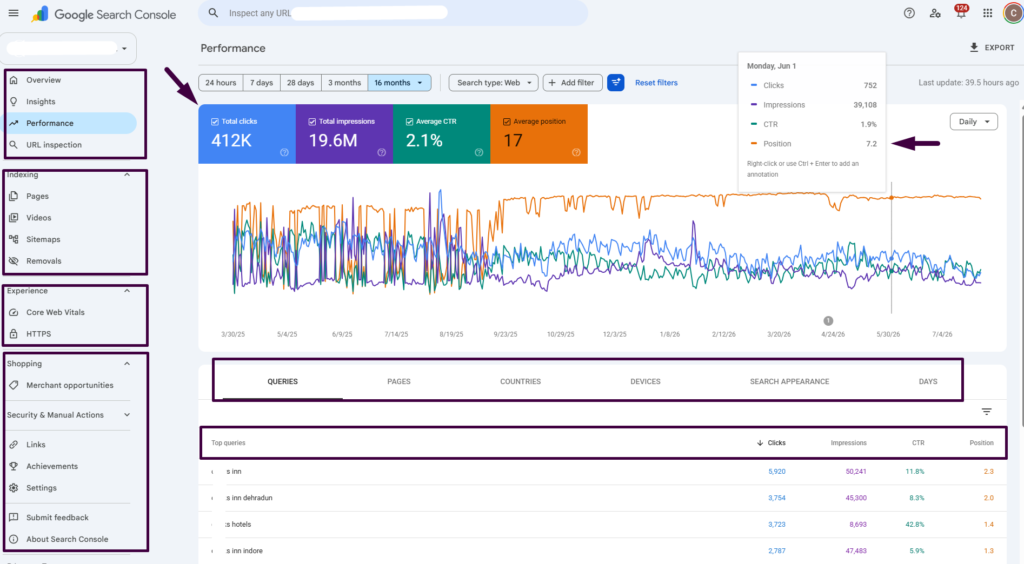
- Track clicks, impressions, and click-through rates (CTR)
- Submit XML sitemaps
- Request indexing for new or updated pages
- Identify crawl and indexing issues
- Monitor Core Web Vitals and page experience
- Validate structured data (Schema Markup)
- Detect mobile usability issues
- Review internal and external links
- Receive alerts about security problems or manual actions
These insights help you make informed SEO decisions based on actual search data rather than assumptions.
Why Google Search Console Matters More Than Ever
Search engine optimization has changed dramatically over the last few years.
Previously, many websites ranked well simply by targeting keywords and building backlinks.
Today, Google evaluates hundreds of signals before deciding which pages deserve visibility.
Some of the most important include:
- Content quality
- Search intent satisfaction
- Technical SEO
- User experience
- Website speed
- Mobile usability
- Structured data
- Website security
- Internal linking
- Freshness
- Topical authority
Many of these factors can be monitored directly within Google Search Console.
For example, if Google cannot crawl one of your important pages, that page may never appear in search results—no matter how well-written the content is.
Similarly, if your website has poor Core Web Vitals or indexing issues, your organic performance may suffer despite having valuable information.
Google Search Console helps you identify these problems before they impact your rankings.
Think of it this way:
If Google Analytics tells you what users do after they visit your website, Google Search Console tells you why they found—or didn’t find—your website in the first place.
That distinction makes GSC one of the most important tools in any SEO toolkit.
How Google Search Console Works
To understand the value of Google Search Console, it’s helpful to know how Google Search works behind the scenes.
Every page published on the web goes through four major stages before it can appear in search results.
1. Discovery
Google first needs to discover that your page exists.
It finds new pages through:
- Internal links
- Backlinks from other websites
- XML sitemaps
- Previously indexed pages
If Google cannot discover your page, it has no opportunity to rank it.
2. Crawling
Once Google discovers a page, Googlebot visits it to understand its content.
During this process, Google analyzes:
- HTML structure
- Content
- Images
- Internal links
- Metadata
- Structured data
- JavaScript rendering
- Canonical tags
If Googlebot encounters server errors, blocked resources, or robots.txt restrictions, crawling may fail.
Google Search Console reports these crawl issues so you can fix them quickly.
3. Indexing
After crawling, Google decides whether the page should be stored in its search index.
Not every crawled page gets indexed.
A page may be excluded because:
- It has duplicate content.
- A noindex directive is present.
- Google considers it low quality.
- Canonical tags point elsewhere.
- The content provides little unique value.
- Technical errors prevent indexing.
One of the most valuable reports in Google Search Console is the Pages (Indexing) report, which explains why pages are indexed—or why they aren’t.
4. Ranking
Only after a page has been indexed can it compete for rankings.
Google evaluates hundreds of ranking signals, including:
- Relevance to the search query
- Content quality
- E-E-A-T signals
- Backlinks
- Page experience
- User engagement
- Website authority
- Search intent alignment
Google Search Console won’t tell you Google’s exact ranking algorithm, but it does show how your pages are performing for real search queries, helping you identify opportunities to improve.
A Real-World Example: How GSC Solves an SEO Problem
Let’s say you publish a detailed guide titled “Best Wildlife Resorts Near Gir National Park.”
After two weeks, you notice the page isn’t receiving any traffic.
Instead of guessing, you open Google Search Console and inspect the URL.
You discover the page has the status:
Crawled – Currently Not Indexed
This tells you Google has visited the page but decided not to include it in the search index.
Armed with this insight, you can investigate potential causes:
- Does the article offer enough original value?
- Is it too similar to existing pages?
- Could it benefit from stronger internal linking?
- Are there enough firsthand insights or unique recommendations?
- Is the title aligned with user search intent?
After improving the content, enhancing internal links, and updating the page with original images and practical tips, you request re-indexing through the URL Inspection Tool.
Within a few days or weeks, the page is indexed and begins appearing for relevant search queries.
Without Google Search Console, you might never have known why the page wasn’t ranking.
Part 2, we’ll dive into the core reports and features inside Google Search Console: