
Now that you understand what Google Search Console is and why every website needs it, it’s time to explore the reports that make it one of the most powerful SEO tools available.
Many beginners verify their website in Google Search Console, submit a sitemap, and never return. Experienced SEO professionals do the opposite; they check Google Search Console regularly because it provides direct insights into how Google views their website and where opportunities for improvement exist.
Every report inside Google Search Console answers a specific SEO question:
- Which keywords bring visitors to my website?
- Why isn’t this page indexed?
- Which pages are losing traffic?
- Is my website fast enough?
- Can Google crawl every important page?
- Are my structured data and schema working correctly?
Instead of making assumptions, you use Google’s own data to make informed SEO decisions.
1. Performance Report: Your Most Valuable SEO Dashboard
If there is one report every SEO professional should check weekly, it’s the Performance Report.
This report shows exactly how your website performs in Google Search by providing four key metrics:
| Metric | What It Means | Why It Matters |
|---|---|---|
| Clicks | Number of users who clicked your result | Measures actual organic traffic |
| Impressions | Number of times your page appeared in search | Indicates visibility |
| Average CTR | Percentage of impressions that became clicks | Reveals how compelling your title and description are |
| Average Position | Average ranking for a query | Helps monitor keyword performance |
Unlike many third-party SEO tools that estimate rankings, these numbers come directly from Google.
What Can You Learn from the Performance Report?
Imagine your page receives:
- 28,000 impressions
- 420 clicks
- 1.5% CTR
- Average position: 9
Most website owners would simply celebrate the impressions.
An SEO expert sees an opportunity.
A page ranking between positions 7 and 12 often needs only small improvements to move onto the first page’s top results. Updating the title tag, strengthening internal links, improving content depth, or adding FAQs could increase both rankings and CTR.
This is why the Performance Report isn’t just a reporting tool—it’s an SEO opportunity finder.
Discover Hidden Keyword Opportunities
One of the biggest advantages of Google Search Console is that it reveals keywords you may not even realize you’re ranking for.
For example, you might publish an article targeting:
“Luxury Hotels in Mussoorie”
But GSC shows people are finding your page through searches like:
- Boutique hotels in Mussoorie
- Hotels near Mall Road Mussoorie
- Best luxury stay in Mussoorie
- Family resorts in Mussoorie
Instead of creating separate pages immediately, you can naturally expand your existing content to address these related search intents.
This approach improves topical relevance and often increases visibility across a broader range of keywords.
SEO Expert Tip: Review your top-performing queries every month. If you notice high-impression keywords that aren’t fully covered in your content, update the page rather than creating thin, overlapping articles.
2. URL Inspection Tool: See Your Website Through Google’s Eyes
One of the most frequently used features in Google Search Console is the URL Inspection Tool.
Whenever you publish, update, or troubleshoot a page, this should be your first stop.
Simply paste any URL into the search bar, and Google will tell you exactly how it sees that page.
The URL Inspection Tool can answer questions such as:
- Is the page indexed?
- When was it last crawled?
- Can Google access it?
- Which canonical URL is being used?
- Is structured data detected?
- Can rich results be generated?
Instead of guessing why a page isn’t ranking, you receive direct feedback from Google.
Example Scenario
Suppose you’ve just published a comprehensive guide titled:
“Shopify SEO Optimization Checklist.”
After several days, the article still doesn’t appear in search results.
When you inspect the URL, Google returns:
“Discovered – Currently Not Indexed.”
This means Google knows the page exists but hasn’t crawled it yet.
Possible reasons include:
- Low crawl priority
- Weak internal linking
- Newly launched website
- Limited website authority
Now compare that with another message:
“Crawled – Currently Not Indexed.”
This indicates Google has reviewed the page but decided not to include it in its index.
In this case, the issue often relates to content quality, duplication, or lack of unique value.
The distinction is important because each status requires a different solution.
When Should You Request Indexing?
Many beginners request indexing every time they make a tiny edit.
That’s unnecessary.
Use the Request Indexing feature after:
- Publishing a new page
- Significantly updating existing content
- Fixing technical SEO issues
- Correcting structured data errors
- Improving content quality
- Resolving indexing problems
Google will recrawl the page when appropriate, but requesting indexing after meaningful improvements can speed up the process.
3. Pages (Indexing) Report: One of the Most Important Technical SEO Reports
A beautifully written page can’t rank if it isn’t indexed.
The Pages (Indexing) Report helps you understand which pages Google has indexed and why others have been excluded.
This report categorizes your pages into groups such as:
- Indexed
- Crawled – Currently Not Indexed
- Discovered – Currently Not Indexed
- Duplicate without user-selected canonical
- Alternate page with proper canonical
- Soft 404
- Not found (404)
- Blocked by robots.txt
- Excluded by ‘noindex’ tag
Each category tells a story about how Google processes your content.
Understanding Common Indexing Issues
Crawled – Currently Not Indexed
Google visited the page but decided not to index it.
Possible causes include:
- Thin content
- Duplicate information
- Poor user value
- Weak internal linking
- Limited topical authority
Discovered – Currently Not Indexed
Google knows the page exists but hasn’t crawled it yet.
This often happens on:
- Large websites
- Newly launched domains
- Sites with crawl budget limitations
Improving internal linking and submitting an updated XML sitemap often helps.
Duplicate Without User-Selected Canonical
Google believes another page is more suitable for indexing.
Check:
- Canonical tags
- URL parameters
- Similar content
- Pagination
Ignoring canonical issues can split ranking signals across multiple URLs.
Soft 404
A page exists but appears to offer little or no meaningful content.
Common causes include:
- Empty category pages
- Placeholder content
- Thin landing pages
Strengthening the content or redirecting the page may be the best solution.
4. XML Sitemaps: Helping Google Discover Your Content Faster
An XML sitemap acts as a roadmap for search engines.
It tells Google which pages are important and should be crawled.
Although Google can discover pages through internal links, submitting a sitemap ensures important URLs are more easily found, especially on large or frequently updated websites.
Inside Google Search Console, the Sitemaps section lets you:
- Submit a new sitemap
- Check when Google last read it
- Monitor errors
- See how many URLs have been discovered
For websites that regularly publish blogs, products, or location pages, keeping your sitemap updated is an essential maintenance task.
Best Practice: Only include indexable, canonical URLs in your sitemap. Avoid adding pages blocked by
noindex, redirects, or duplicate content.
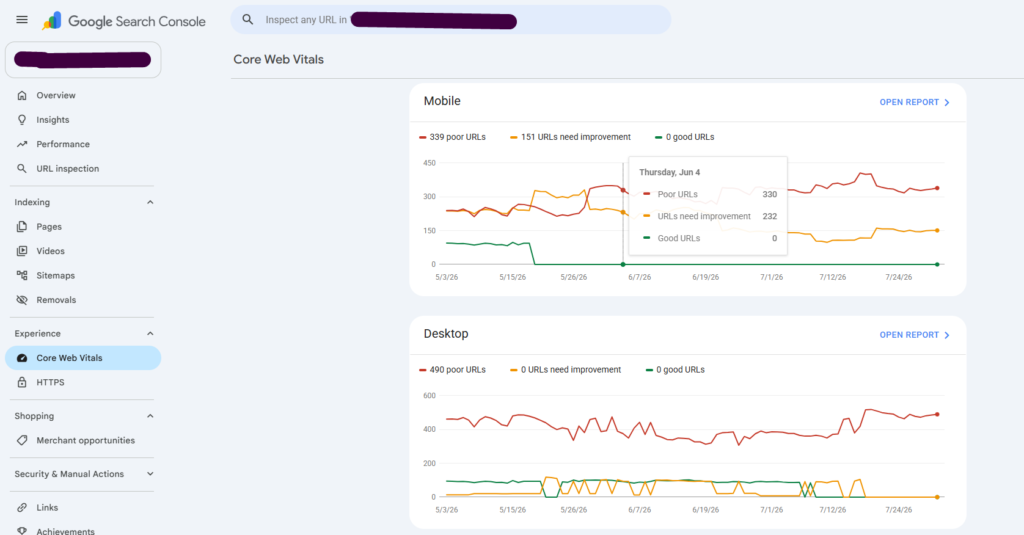
5. Core Web Vitals: Measuring Real User Experience
Google doesn’t just evaluate what your content says; it also evaluates how users experience your website.
The Core Web Vitals report measures real-world page performance using data collected from Chrome users.
The three key metrics are:
| Metric | Measures | Good Threshold |
|---|---|---|
| Largest Contentful Paint (LCP) | Loading speed | ≤ 2.5 seconds |
| Interaction to Next Paint (INP) | Responsiveness | ≤ 200 milliseconds |
| Cumulative Layout Shift (CLS) | Visual stability | ≤ 0.1 |
These metrics influence user experience and are part of Google’s Page Experience signals.
For example, if a user tries to click a button but the page shifts unexpectedly because an image loads late, that’s a poor experience—and CLS captures it.
Why Core Web Vitals Matter
Imagine two websites offering equally helpful content.
One loads in under two seconds and remains visually stable.
The other takes six seconds to load, and the layout keeps shifting.
Which one is more likely to keep users engaged?
Google aims to reward websites that provide a smoother, faster experience.
Improving Core Web Vitals can reduce bounce rates, increase engagement, and support stronger organic performance over time.
6. Links Report: Understanding Your Website’s Authority
Backlinks remain one of Google’s strongest ranking signals, but internal links are equally important for helping Google understand your website’s structure.
The Links Report provides insights into:
- External websites linking to you
- Your most linked pages
- Anchor text used by other websites
- Internal linking patterns
This report helps answer questions like:
- Which pages have earned the most authority?
- Are important pages receiving enough internal links?
- Are there orphan pages that Google struggles to discover?
For example, if your homepage has hundreds of internal links but an important service page has only one, Google may interpret that page as less important.
A strategic internal linking structure distributes authority across your website and improves crawlability.
7. Security Issues and Manual Actions
One of the most critical, but often overlooked, sections of Google Search Console is Security & Manual Actions.
Google uses this area to notify website owners about serious issues that could affect visibility, such as:
- Malware infections
- Hacked content
- Spam
- Phishing
- Unnatural link schemes
- Thin or deceptive content that violates Google’s policies
If your site receives a manual action, rankings can decline dramatically until the issue is resolved and a successful reconsideration request is submitted.
Checking this report regularly helps you catch problems early and protect your site’s reputation.
How Experienced SEO Professionals Use Google Search Console
Google Search Console isn’t just a monitoring tool; it’s a decision-making tool.
Experienced SEO professionals use it to:
- Identify pages with high impressions but low CTR and rewrite titles and meta descriptions.
- Find keywords ranking in positions 8–20 and strengthen those pages with additional content and internal links.
- Diagnose indexing issues before they impact traffic.
- Monitor Core Web Vitals after design or development updates.
- Validate structured data for rich results.
- Discover new keyword opportunities based on actual search queries.
- Prioritize content updates using real performance data instead of guesswork.
Rather than reacting to traffic drops after they happen, they use GSC to identify early warning signs and continuously improve their websites.
Part 3: Using Google Search Console to Build E-E-A-T, Optimize for AI Search, and Future-Proof Your SEO Strategy: